# Event Sourcing Introduction

{% hint style="info" %}
Works with: **Laravel**, **Symfony**, and **Standalone PHP**
{% endhint %}

## The Problem

You store the current state but not how you got there. When a customer disputes a charge, you can't answer "what exactly happened?" Rebuilding read models after a schema change means writing migration scripts by hand.

## How Ecotone Solves It

Ecotone's **Event Sourced Aggregates** store events instead of current state. Every state change is an immutable event in a stream. Projections rebuild read models from event history — change the schema, replay the events, get a correct read model.

{% hint style="success" %}
**Event-sourced sagas are durable workflows.** When a long-running process — order fulfillment, payouts, multi-step onboarding — *is* its history, model it as an `#[EventSourcingSaga]`: every state transition is an event in your own database, the saga rebuilds itself by replaying those events, and you can project the same events into any view, audit log, or dashboard your application needs. See [Durable Execution in PHP](/solutions/durable-execution.md) for the full story.
{% endhint %}

***

Before diving into this section be sure to understand how Aggregates works in Ecotone based on [previous sections](/modelling/command-handling/state-stored-aggregate.md).

## Difference between Aggregate Types

Ecotone provides higher level abstraction to work with Event Sourcing, which is based on Event Sourced Aggregates.\
Event Sourced Aggregate just like normal Aggregates protect our business rules, the difference is in how they are stored.

### State-Stored Aggregates

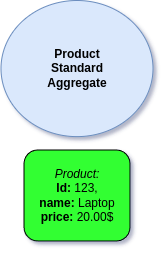
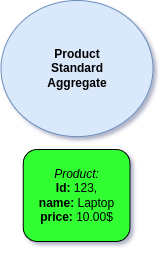
Normal Aggregates are stored based on their current state:

<figure><img src="/files/KNXVr5OHC19JF1wSJYMn" alt=""><figcaption><p>State-Stored Aggregate State</p></figcaption></figure>

Yet if we change the state, then our previous history is lost:

<figure><img src="/files/lZsOITuY19J5KIvZamns" alt=""><figcaption><p>Price was changed, we don't know what was the previous price anymore</p></figcaption></figure>

Having only the current state may be fine in a lot of cases and in those situation it's perfectly fine to make use of [State-Stored Aggregates](/modelling/command-handling/state-stored-aggregate.md#state-stored-aggregate). This is most easy way of dealing with changes, we change and we forget the history, as we are interested only in current state.

{% hint style="success" %}
When we actually need to know what was the history of changes, then State-Stored Aggregates are not right path for this. If we will try to adjust them so they are aware of history we will most likely complicate our business code. This is not necessary as there is better solution - **Event Sourced Aggregates**.
{% endhint %}

### Event Sourcing Aggregate

When we are interested in history of changes, then Event Sourced Aggregate will help us.\
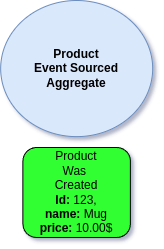
Event Sourced Aggregates are stored in forms of Events. This way we preserve all the history of given Aggregate:

<figure><img src="/files/oFanFoeLQOa2cC1kCUtO" alt=""><figcaption><p>Event-Sourced Aggregate</p></figcaption></figure>

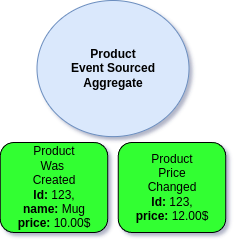
When we change the state the previous Event is preserved, yet we add another one to the audit trail (Event Stream).

<figure><img src="/files/HJPL1Sq1eHjMXtbmrfuh" alt=""><figcaption><p>Price was changed, yet we still have the previous Event in audit trail (Event Stream)</p></figcaption></figure>

This way all changes are preserved and we are able to know what was the historic changes of the Product.

## Event Stream

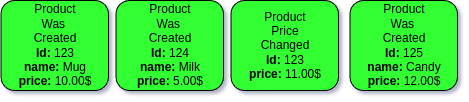
The audit trail of all the Events that happened for given Aggregate is called **Event Stream**.\
Event Stream contains of all historic Events for all instance of specific Aggregate type, for example all Events for Product Aggregate

<figure><img src="/files/AjUtmUxQ6XnhfGlKZIVB" alt=""><figcaption><p>Product Event Stream</p></figcaption></figure>

Let's now dive a bit more into Event Streams, and what they actually are.


---

# Agent Instructions: Querying This Documentation

If you need additional information that is not directly available in this page, you can query the documentation dynamically by asking a question.

Perform an HTTP GET request on the current page URL with the `ask` query parameter:

```
GET https://docs.ecotone.tech/modelling/event-sourcing/event-sourcing-introduction.md?ask=<question>
```

The question should be specific, self-contained, and written in natural language.
The response will contain a direct answer to the question and relevant excerpts and sources from the documentation.

Use this mechanism when the answer is not explicitly present in the current page, you need clarification or additional context, or you want to retrieve related documentation sections.